| |
- Give your customers the power of talking to a support representative INSTANTLY by offering live support chat.
- 100% web-based and cross browser compatible. Nothing to download or install!
- When technicians set themselves as available the chat button becomes active in the customer interface. If there are no technicians available the button will show chat as offline.
- Technicians are instantly notified of new chat sessions.
- Both customers and technicians can send files to each other directly in the chat window.
- Both customers and technicians can see that the other is typing, allowing them to know that the other party is writing a response.
- Technicians can see a customer's account details with the click of the button, including their current I.P. address, reverse DNS lookup, the browser and OS they are using and how many tickets they have open.
- Web addresses (URLs) and email addresses are automatically hyperlinked making it easy for both parties to share information.
- Chat sessions can easily be forwarded by the technician to another technician to either take it over or join. Sessions can also be placed back into the queue of waiting chat sessions for the next available technician to join.
- Customers and technicians can easily print and/or email chat transcripts to the address of their choosing.
- Tickets can be created directly from a chat session, including the complete chat transcript in HTML formatting as the summary of the ticket.
- Technicians can quickly search live support session transcripts to reference previous conversations.
- Both technicians and customers are alerted by a sound when the other sends a new message. Both can also toggle these sounds on and off.
- Technicians can create auto-text messages to send the instant they join a chat session. This is useful for sending a commonly typed greeting, such as "Hello, how can I help you today?"
- Technicians can create and save multiple canned text phrases for quickly retrieving and sending commonly typed messages.
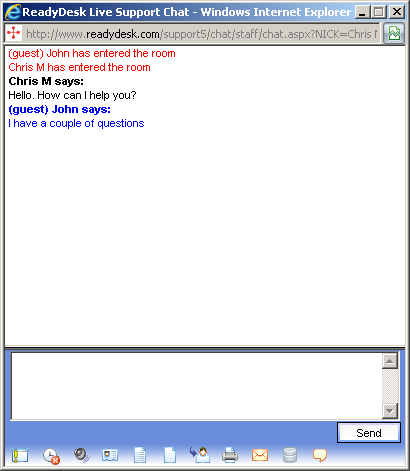
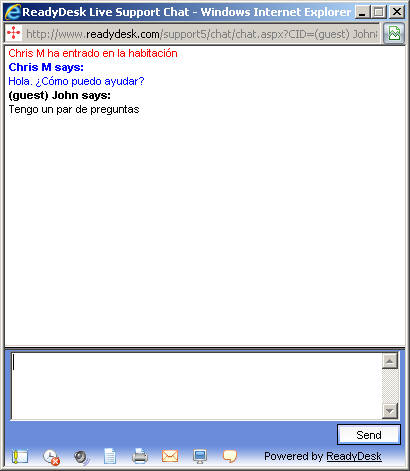
- New! Real-time translations. Customers and technicians can chat with each other in their native language, and ReadyDesk will automatically translate the text into the language of the other party.
- New! Text to speech and speech recognition. The new HTML5 standard includes a speech API. This allows for text to speech and speech recognition directly through the browser, with no special plug-ins required. We have built both of these features into live chat. When text to speech is turned on (it is off by default) the text the other party sends will be read out loud. If you choose a non-English voice, such as Spanish, it will automatically speak the translated message. Speech recognition allows you to speak into your computer's microphone and it will automatically enter the spoken words as text in the message field in live chat. We have added some commands like "delete that" and "send message" for even less dependence on using the keyboard. These features are very new, and should be considered experimental for the time being.
* NOTE: Google Chrome is currently the only browser that supports the HTML5 Speech API. Firefox and Internet Explorer are said to be working on these features for their own future releases.
- New! Easily add a custom chat button to any external web page. Technicians can manually send chat invites to your site visitors. You can also set up workflow rules to automatically send chat invites based on the page being viewed, time spent on a certain page and even based on geographic location.
Technician chatting in English
|
|
Visitor chatting in Spanish
|
 |
|
 |
|
|
|